
Click or drag to upload image
Upload a room photo to get started

Room GPT: AI-Powered Space Transformation
Upload your photo and let this intelligent tool redesign your living space. Choose from modern, minimalist, Scandinavian, and 20+ design styles to visualize your dream interior in seconds—completely free.
What is Room GPT?


Intelligent Space Analysis
The AI analyzes your uploaded photo, recognizing layouts, furniture placement, lighting conditions, and architectural features to deliver tailored suggestions.

Multi-Style Transformation
From Scandinavian minimalism to industrial chic, the platform applies cohesive style elements including furniture, colors, textures, and decorative accents.
Why Choose Room GPT
Discover why thousands of homeowners, decorators, and real estate professionals trust this platform.

Instant Visualization
See dozens of style variations in minutes instead of weeks. Make confident decisions before purchasing furniture or starting renovations.

Professional Quality
Generate photorealistic renderings that rival professional visualization studios. Perfect for mood boards and project planning.

Zero Cost Access
Start designing without subscriptions or hidden fees. Premium capabilities at no cost for your home decoration projects.
How to Use Room GPT
Transform your space in four simple steps. No design experience required.
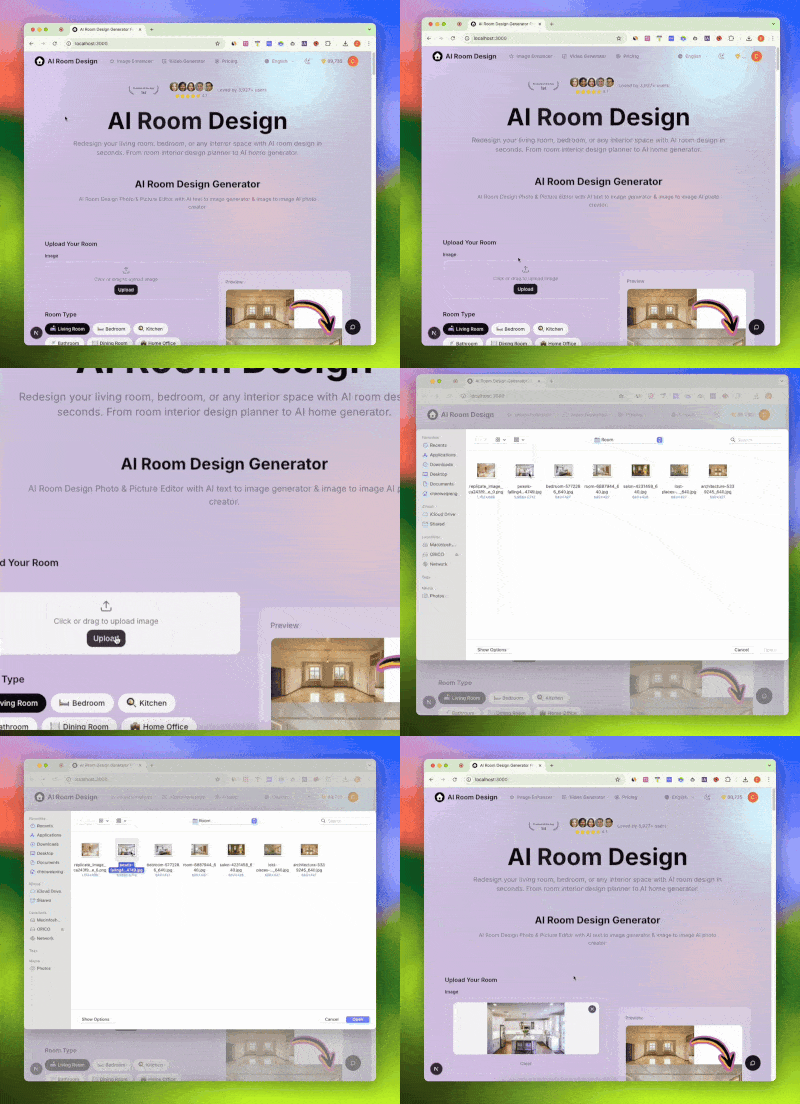
Upload Your Photo
Take a picture of your living area, bedroom, kitchen, or any space. The tool accepts JPG, PNG, WebP, and HEIC formats.
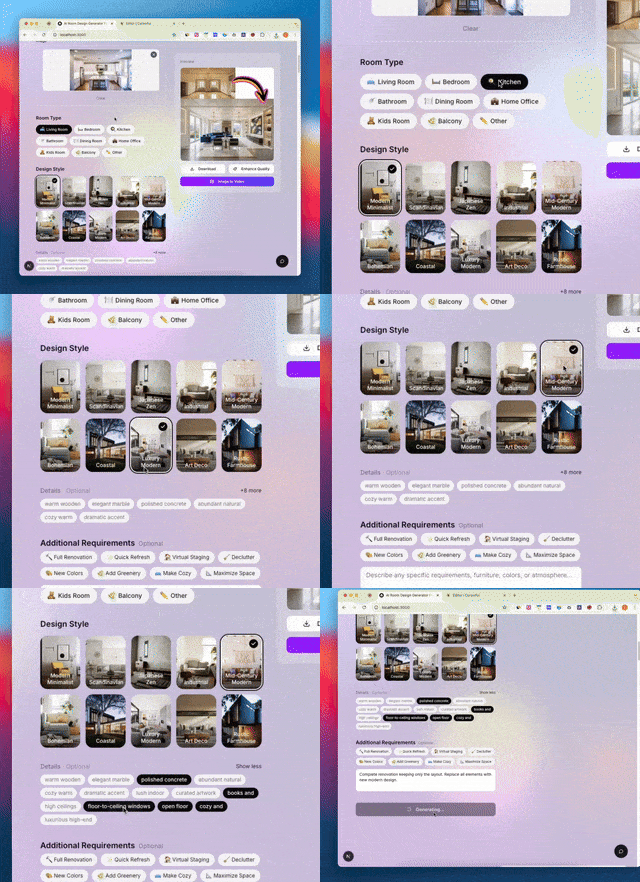
Choose Your Style
Browse 20+ curated aesthetics including Modern, Japanese Zen, Bohemian, Coastal, Art Deco, and more.
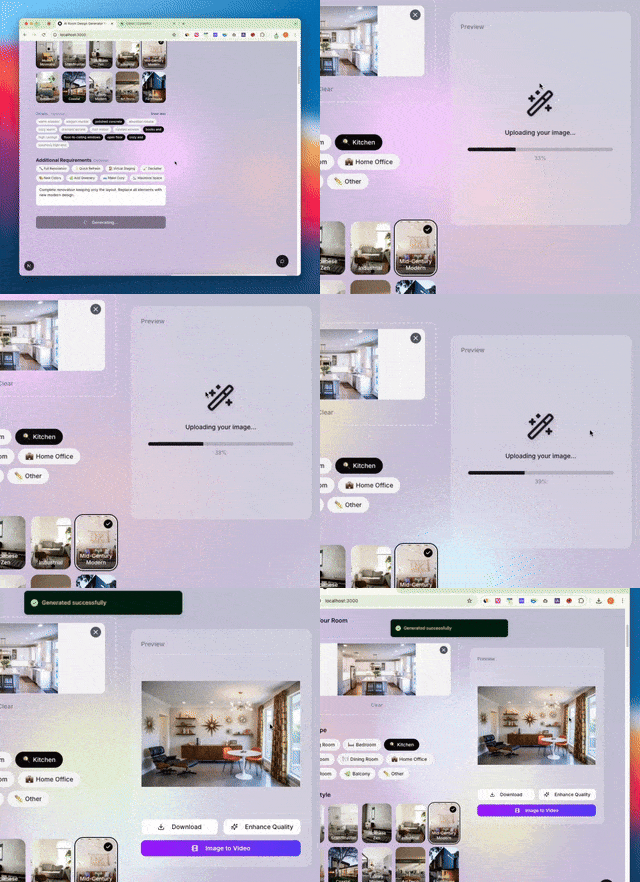
Generate Design
Click generate and let the AI work its magic. Results appear in seconds with realistic rendering quality.
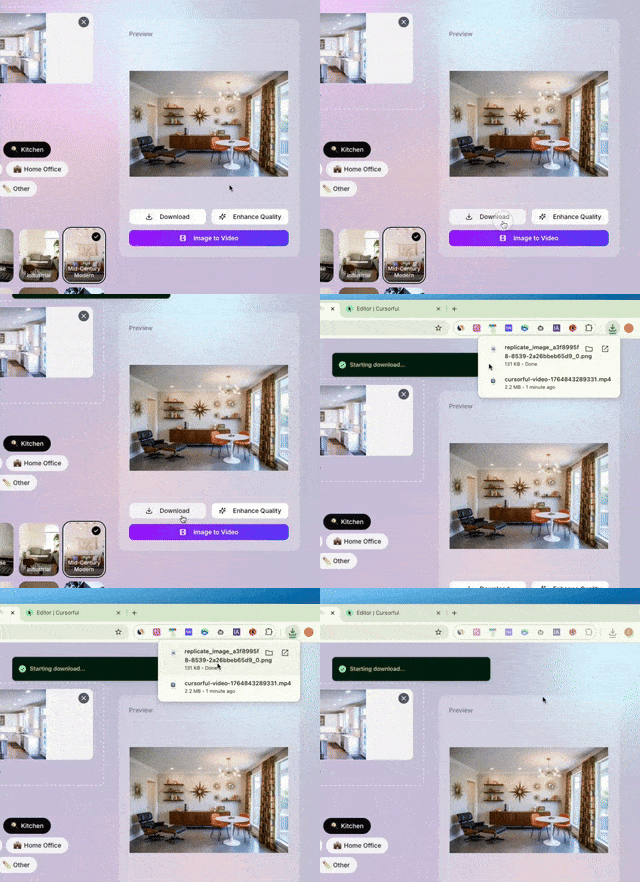
Download Results
Save high-resolution images for presentations, contractor discussions, or social media sharing.
Complete AI Design Suite
Comprehensive features powered by cutting-edge technology for all your space planning needs.
20+ Style Options
Modern Minimalist, Bohemian, Industrial, Coastal—every aesthetic covered for your home.
All Space Types
Transform living areas, bedrooms, kitchens, bathrooms, offices, and more with specialized algorithms.
Instant Processing
Get transformed visualizations in seconds, not hours. Ideal for quick comparisons.
HD Output Quality
Download crisp images suitable for presentations, printing, or sharing with contractors.
Smart Suggestions
Each style includes curated furniture and decor recommendations matching your aesthetic.
Color Guidance
Harmonious color schemes suggested based on style choice for paints, fabrics, and accessories.
Room GPT by the Numbers
Join thousands of satisfied users transforming their spaces with intelligent design technology.
Designs Generated
2M+
Space transformations created
Active Users
100K+
Homeowners and professionals
Style Options
20+
Curated aesthetic choices
Satisfaction Rate
98%
Users love their results
What Users Say
Real feedback from homeowners and professionals using the platform.
Sarah Mitchell
Homeowner
I was skeptical about AI for home decoration, but this changed everything. I visualized my living area makeover before spending anything on furniture. The modern style suggestion was exactly what I wanted!
James Chen
Real Estate Agent
This tool is now essential for my property listings. I can show clients the potential of empty spaces instantly. Scandinavian and minimalist styles are especially popular with buyers.
Emma Rodriguez
Home Stager
As someone who stages homes professionally, this helps me communicate ideas to clients before physical staging. It saves hours of explanation and revision cycles.
Michael Park
DIY Renovator
Finally, a free tool that delivers quality results. I've used it for my kitchen and bedroom projects. The before/after comparisons helped convince my wife on the industrial style!
Frequently Asked Questions
Get answers to common questions about this AI-powered space transformation platform.
Is Room GPT really free to use?
Yes! The platform offers free access to core features including style transformations, multiple design options, and high-resolution downloads. We believe everyone should have access to quality visualization tools for their home decoration projects without expensive subscriptions.
How does the AI technology work?
The system uses advanced neural networks trained on millions of professionally decorated spaces. When you upload a photo, it recognizes elements like walls, furniture, and lighting, then applies your chosen style while maintaining realistic proportions and perspective.
What types of spaces can I redesign?
The tool works with any area including living spaces, bedrooms, kitchens, bathrooms, dining areas, home offices, nurseries, and even commercial environments. Each space type benefits from specialized algorithms that understand furniture placement and functional requirements.
Which design styles are available?
Over 20 curated styles are offered: Modern Minimalist, Scandinavian, Japanese Zen, Industrial, Mid-Century Modern, Bohemian, Coastal, Luxury Modern, Art Deco, Rustic Farmhouse, and more. Each style has been refined to deliver authentic, cohesive results.
Can I use results for professional presentations?
Absolutely! High-resolution outputs are perfect for mood boards, client presentations, contractor discussions, and social media. Many real estate agents and home stagers use the platform daily for their professional needs.
How accurate are the AI-generated designs?
The AI produces photorealistic results that accurately represent how your space would look with new furnishings and decor. While actual implementation may vary slightly, the visualizations provide excellent guidance for decoration decisions.
Is this better than hiring a professional decorator?
This tool complements professional services rather than replacing them. It's perfect for initial exploration, quick visualizations, and budget-conscious projects. Professionals can also use outputs as communication tools with their clients.
What image formats are supported?
All common formats are accepted including JPG, PNG, WebP, and HEIC from iPhones. For best results, use well-lit photos taken from a corner to capture the full perspective.
How long does generation take?
Most transformations complete in 10-30 seconds depending on complexity. The optimized AI pipeline delivers fast results without compromising quality, letting you explore multiple styles quickly.
Can I redesign the same space multiple times?
Yes! We encourage experimenting with different styles. Upload once and try Modern, then Scandinavian, then Industrial—compare all options side by side to find your perfect aesthetic.
Does the AI keep my layout intact?
The AI respects your architecture including windows, doors, and structural elements. It transforms the aesthetic while maintaining the fundamental layout and proportions of your space.
What about small space design?
The AI is trained on spaces of all sizes. For smaller areas, it suggests space-efficient furniture arrangements and lighter color palettes that create an illusion of more openness.
Is there a mobile app available?
The platform is fully responsive and works seamlessly on mobile browsers. Take a photo with your phone and generate designs immediately—no app download required.
How does this compare to other AI design tools like Interior AI or Homestyler?
This platform focuses specifically on space transformation with professionally curated styles. Unlike generic image generators, we understand spatial relationships, furniture scale, and lighting consistency for realistic results that outperform many alternatives.
Can I get furniture recommendations?
Each style transformation includes suggested furniture types and decor elements. While specific product links aren't provided, the visualizations help you identify exactly what pieces to shop for.
Does this work for commercial spaces?
Yes! The tool handles offices, restaurants, retail spaces, and other commercial environments. Many business owners use it to visualize renovations before committing to costly changes.
What makes a good source photo?
For best results, use well-lit photos taken during daytime, shoot from a corner to capture more area, ensure the image is in focus, and avoid excessive clutter that might confuse the AI.
Can I save my design history?
Create a free account to save your designs, compare different style options, and access your transformation history anytime. Your projects are stored securely for future reference.
Is my uploaded photo secure?
Privacy is taken seriously. Photos are processed securely and not shared with third parties. You can delete your uploads anytime from your account settings.
Do you offer API access for developers?
Yes, API access is available for businesses wanting to integrate AI capabilities into their platforms. Contact us for enterprise pricing and documentation.
How does Room GPT compare to using Planner 5D or SketchUp?
Unlike traditional floor planning tools that require manual 3D modeling, this platform transforms real photos instantly. It's faster for visualization while those tools are better for detailed floor plans and measurements.
Can students use this for design projects?
Absolutely! Students and educators find this valuable for learning about styles, creating presentations, and exploring concepts without expensive software. Many architecture and design students use it regularly.
What if I don't like the generated result?
Simply try a different style or adjust your source photo. The AI generates unique results each time, so you can experiment until you find the perfect look for your space.
Does the tool support different languages?
Yes, the interface is available in multiple languages including English, Spanish, German, French, Japanese, and more to serve our global user community.
Can I use this for rental properties?
Yes! Landlords and property managers use the tool to visualize potential improvements and show tenants or buyers what spaces could look like with different styling approaches.
Transform Your Space Today
Join thousands of homeowners and professionals creating stunning visualizations. Upload your photo and see the possibilities in seconds—completely free.